Add Text to PDF

{{verb-widget-legal}}

Best in class PDF editing from the makers of PDF. Trusted by millions.

Add text to PDFs online for free with Acrobat.

Try our free PDF editor and speed up your document workflows.

https://main--dc--adobecom.aem.live/dc-shared/assets/images/shared-images/frictionless/seo-icons/comment.svg

Collect feedback with comments.

Drop in sticky notes, suggest changes by replacing or adding text, and tag teammates to keep reviews clear and collaborative.

https://main--dc--adobecom.aem.live/dc-shared/assets/images/shared-images/frictionless/seo-icons/annotate.svg

Annotate PDFs your way.

Place text boxes anywhere on the page and choose the fonts and formatting that suit your document.

https://main--dc--adobecom.aem.live/dc-shared/assets/images/shared-images/frictionless/seo-icons/draw.svg

Mark up PDFs with drawings.

Sketch freehand, or add lines and shapes in a variety of colors and styles.

https://main--dc--adobecom.aem.live/dc-shared/assets/images/shared-images/frictionless/seo-icons/highlight.svg

Highlight key text.

Make text stand out by highlighting it in multiple colors. You can even attach a note to add context.

https://main--dc--adobecom.aem.live/dc-shared/assets/images/shared-images/frictionless/seo-icons/fill-sign.svg

Fill out and sign PDFs.

Fill and sign documents digitally. Complete form fields, check boxes, and add your signature.

https://main--dc--adobecom.aem.live/dc-shared/assets/images/shared-images/frictionless/seo-icons/share-2.svg

Share your PDF with anyone.

Send a link to your PDF so anyone can view it and collaborate on the document.

How to add text to a PDF online

Adding text to a PDF is quick, simple, and free. Follow these steps to get it done in minutes.
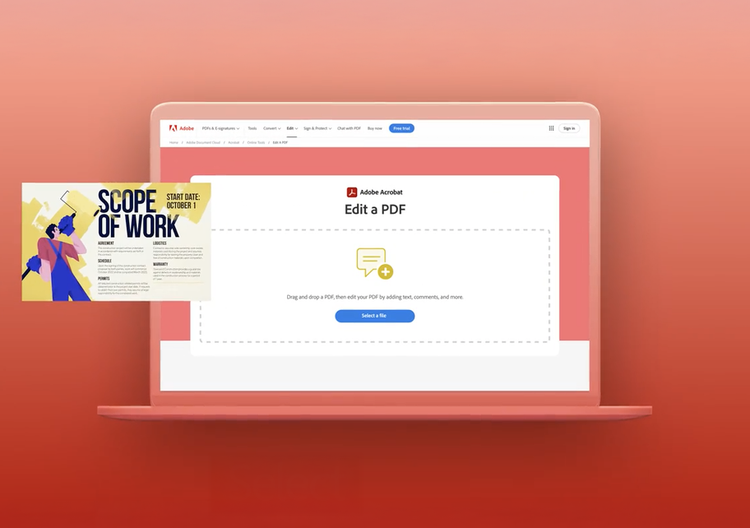
  • Choose a PDF by clicking the Select a file button above, or drag and drop your file into the drop zone.
  • Select the text box tool from the toolbar, click anywhere in the PDF, and type your text. Adjust the font, size, and color as needed.
  • To download the edited PDF, sign-in with your free Adobe account.
  • Once signed-in download your updated PDF or share a link directly from Acrobat.
Verb
add-text-to-pdf

More ways to work with PDFs

Try our online tools to convert, compress, and merge PDF files - Acrobat can do it all.

Headshot of Madison R., owner and founder of Flirty Pineapple

"If you're running a small business and constantly updating documents, like campaign materials, pitch decks, contracts, or invoices, Acrobat makes editing easy and efficient."

-Madison R.

Flirty Pineapple

Questions? We have answers.
How do I add text to a PDF online for free?
Upload your PDF to Adobe Acrobat's free online tool, sign in with a free Adobe account, and use the text box tool to click anywhere in the document and type. You can adjust the font, size, and color before downloading or sharing your edited file.
Can I add text to a PDF without editing the original content?
Yes. Adobe Acrobat's text tool lets you add new text boxes on top of your PDF without altering the existing document content. Use text boxes for annotations, labels, or form responses that sit as a new layer above the original text.
How can I use this tool to fill out a PDF form?
If you need to fill in form fields, use Acrobat's free Fill and Sign tool to complete PDF forms. For documents without built-in form fields, you can use the text box tool to type your answers directly onto the page.
What kinds of text can I add to a PDF with Adobe Acrobat?
With Adobe Acrobat's online editor, you can add text boxes with custom fonts and formatting, sticky notes for comments and feedback, and markup text. For advanced edits like changing existing body text or reflowing paragraphs, an Acrobat Pro subscription is required.
Why use Adobe Acrobat to add text to a PDF?
Adobe invented the PDF format in 1993 and has been the global standard for PDF software for over 30 years. Acrobat's text tool maintains the formatting and layout integrity of your original document, something many free alternatives struggle with.
What file types does the text editor support?
Adobe Acrobat's online text editor works with standard .pdf files. If you need to add text to a Word document, Excel spreadsheet, or image file, convert it to PDF first using Acrobat's free conversion tools, then add your text.
Does this tool work on mobile and tablet?
Yes. Adobe Acrobat's online PDF text editor works in any modern browser on desktop, tablet, and mobile devices. Select your file, sign in, and add text directly from your phone or tablet without installing anything.
Can small businesses add text to PDFs with Adobe Acrobat's editor for free?
Yes, small businesses can use Adobe Acrobat's free online PDF editor to add text boxes, sticky notes, and annotations to contracts, proposals, and supplier forms, all without needing a subscription. The free tier supports the most common document review and approval tasks, making it practical for lean teams managing campaign materials, pitch decks, and invoices. Businesses that need to edit existing document text, create fillable forms, or batch-process files can upgrade to Adobe Acrobat Pro.
Do I need an Adobe account to add text to a PDF?
You can upload a PDF and start adding text without an account, but a free Adobe account is required to download or share your edited file. Creating a free account takes under a minute and unlocks more than 25 additional online PDF tools in Acrobat.

More resources

Content as a Service v3 - pdf-editor - Friday, April 18, 2025 at 10:50

Try these Acrobat online tools

Convert from PDF

Convert to PDF

Reduce file size

Edit

Sign & Protect

Generative AI

Convert from PDF
Convert to PDF
Reduce file size
Edit
Sign & Protect
Generative AI

Add text to a PDF

Select a file